Wednesday, 8 February 2017

Now recharge your Google Play Account on Paytm

INFORMATION :-

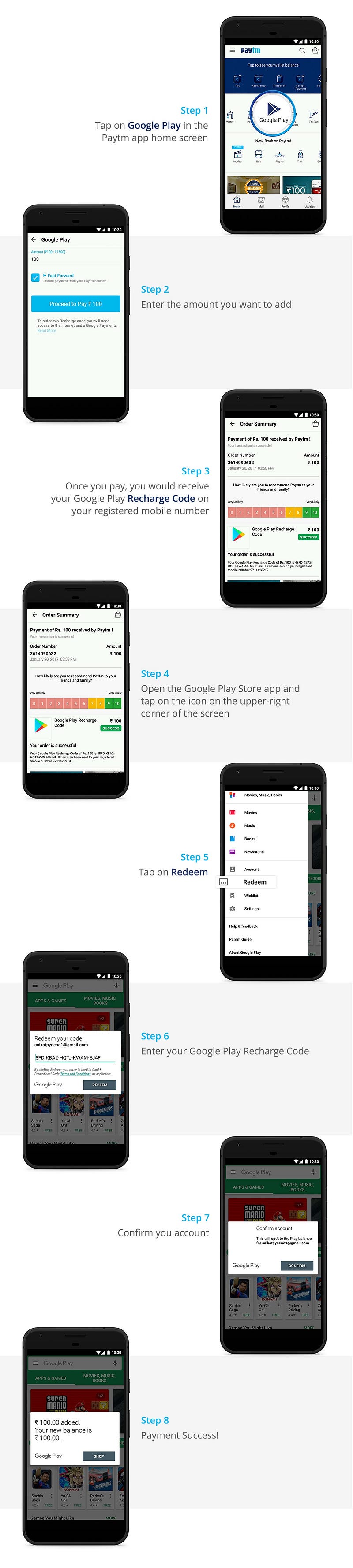
We have recently launched a one-click recharge for Google Play. This will help Android users across India to recharge their Google Play accounts in minutes.
Here is how it works:
In case you have some questions in your mind, here are some FAQs:
  1. Is there any minimum or maximum amount for recharge?
You can recharge between Rs. 100–1500 at a single go on Paytm.
2. What if I don’t have the Google Play app on my smartphone?
You can easily redeem the recharge code by logging on to g.co/playredeem.
3. What happens if my recharge fails?
We will offer you a unique serial number on the Paytm app and via SMS that you can use to follow up with Google.
4. What happens if I accidentally delete the SMS containing my Google Play Recharge Code?
You can always tap on the relevant order in the ‘My Orders’ tab in the Profile menu of your Paytm app to know your unique Google Play recharge code.
5. I want to download the digital invoice for my recharge.
Please tap on the relevant order in the ‘My Orders’ tab in the Profile menu of your Paytm app. You would see an option to download the official invoice for your recharge.
6. I want to repeat a transaction.
That’s easy. Once you transact on Paytm, we would offer a list of last Google Play recharge transactions in the ‘Recents’ tab. Tap on your preferred recharge amount to instantly recharge your Google Play account.

Monday, 23 January 2017

Cool In-Built Feature to Save Battery Life in Android SmartPhones

Today here I'm going to tell you about a cool feature which comes in-built with most of Smartphones.

Now a days smartphone comes with very High Resolution with bright Colors included (HD Displays)
which consumes lots of power to run.

So, here are the steps to save the battery 2 times better.

1> Go in Settings
2> Scroll down the page to Developer option. (if developer option isn't activate go to >about phone>device information>tap build number 5 to 7 times continuosly, as shown in the video)
3>Go to Developer option and scroll down the page.
4> Select "Simulate Color Space"
5> There you will see 5 option from those select "Monochromacy"

By selecting this option your whole phone displays changes into Black & White mode which does not consist any color. Your Phone's whole menu, setting etc inshort whole display changes to black and white mode which don't consume battery power and you can extend it 2 times more usable.

Note: It would be bad idea while looking and any Pictures or movies 'cause even that would be in black&white mode.


If you Don't like this Function and you want to disable it
> Just go to Simulate color space option and select Disable (1st option).

And other option to save battery which is consumed by Background Running Application can also be controled by you
>just go in Developer options
>Scroll down the page and toggle on the button of Don't keep Activites
>And second option "Background Process Limit" Select that option as at atmost 3-4 processes as per your choice of using application.

If your phone stucks around any apps or it frezze many times it happen just because your phone don't have enough free RAM.
So, Just go and downlaod Greenify App from playstore it is easily available on it.

Add all the applications running on your phone and hibernate it as you are done with your work on the application. this option will give RAM a free space to run device easily.
Or you have any other Question's about any query feel free to ask
2-Mind's.


Monday, 28 November 2016

How To: Change Your Ip In Less Then 1 Minute

How To: Change Your Ip In Less Then 1 Minute
1. Click on "Start" in the bottom left hand corner of screen
2. Click on "Run"
3. Type in "command" and hit ok
You should now be at an MSDOS prompt screen.
4. Type "ipconfig /release" just like that, and hit "enter"
5. Type "exit" and leave the prompt
6. Right-click on "Network Places" or "My Network Places" on your desktop.
7. Click on "properties"
    You should now be on a screen with something titled "Local Area Connection", or something close to    that, and,
     if you have a network hooked up, all of your other networks.
8. Right click on "Local Area Connection" and click "properties"
9. Double-click on the "Internet Protocol (TCP/IP)" from the list under the "General" tab
10. Click on "Use the following IP address" under the "General" tab
11. Create an IP address (It doesn't matter what it is. I just type 1 and 2 until i fill the area up).
12. Press "Tab" and it should automatically fill in the "Subnet Mask" section with default numbers.
13. Hit the "Ok" button here
14. Hit the "Ok" button again
      You should now be back to the "Local Area Connection" screen.
15. Right-click back on "Local Area Connection" and go to properties again.
16. Go back to the "TCP/IP" settings
17. This time, select "Obtain an IP address automatically"
      tongue.gif 18. Hit "Ok"
19. Hit "Ok" again
20. You now have a new IP address
      With a little practice, you can easily get this process down to 15 seconds.
Note:-
          This only changes your dynamic IP address, not your ISP/IP address. If you plan on hacking a          website with this trick be extremely careful, because if they try a little, they can trace it back .
                 Think before you Click...👍

Thursday, 27 October 2016

How to make UN-HACK-ABLE PASSWORD for your security purpose...

As per our last post, We decided to share...

How to make UN-HACK-ABLE PASSWORD for your security purpose...

- Actually you can make this UN-HACK-ABLE Password through your Smartphone easily.

- Just whenever you are going to type your "Password" 

Try to Use "ACCENTED LETTERS"... 
- To Access this letters simply hold down a letter on the Keyboard as per shown in the following Picture.


And select any letter with from top symbols.

You will think this thing is common, but in hacking process each letters have a different role. This will make your Password much stronger than Others. And one important thing, if you are keeping this type of password, Don't Forget about it. ;)

Let us know Is this post helpful for you, Just keep your Vote. 
If any doubt please lets us know through your comments.
Stay Connected, Stay Safe.
2-Mind Solutions.

Friday, 21 October 2016

How To Use PRO-RAT Software To Hack Password's

This is step by step tutorial that explains how to use pro rat software. ProRat is a Microsoft Windows based backdoor Trojan horse, more commonly known as a RAT (Remote Administration Tool). As with other Trojan horses it uses a client and server. ProRat opens a port on the computer which allows the client to perform numerous operations on the server (the machine being controlled). ProRat is available in a free version, and a paid version. In the free version, ProRat cannot connect to users over wide area networks (WANs), only over LAN (Local Area Networks). ProRat is known for its server to be almost impossible to remove without up-to-date antivirus software.


Follow The Steps To Setup PRO RAT Software

Step 1: Download free software called PRO RAT from this LINK . Once you downloaded pro rat software you'll see win rar file . Enter the password pro and extract it to your computer . Launch pro rat. Pro rat has a lot options as key logger, screen shot, file manager, PC shutdown. 

Step 2: You should create ProRat Server and send it to the target PC. To create server click on the bottom Create

hack facebook hack password

Step 3: Enter your IP address if you don't know your IP address click on red arrow . Also add your email address that will be used to send email notification. 

hack facebook hack password

Step 4: Next go to general settings, 5110 is port that you will connect to the target PC, you can change server password. You can give a fake error message, when target launch your remote file, error message will shown. You can type for error message what ever you want . 

hack facebook hack password

You can use option bind with the file. you can bind server with any file. I didn't use this option in this example. 

hack facebook hack password

hack facebook hack password

Under server extension I recommend to use EXE (has icon support ) or SCR (has icon support). 

hack facebook hack password

Under server icon select any icon that you want that your server look out. 

hack facebook hack password

Step 5: Click on Create Server . Now you need to send server file to the target PC. There are many ways how you can do it. You can create server file that looks as image and email it to your friends . The most effective way by my opinion is to bind server file to the movie file and upload it to the torrent or rapid share.  

Step 6: After the target clicks on your server file you'll be able to connect to the target PC. In main window of pro rat you'll see IP field. Type target PC address  There are many ways how to find target PC IP address. I recommend you to try to hack friends PC, so just ask your friend to give you IP address. In the port field type 5110 and click Connect. 

hack facebook hack password

hack facebook hack password

Screen shot of hacked PC : 

hack facebook hack password

File manager of hacked PC. You can download any file from hacked PC. 

hack facebook hack password

NOTE: This article is only for education purpose . Don't try to use it on the computers without user (owner of the computer that you want to hack ) permission!!!!

Sunday, 16 October 2016

Ransomeware Alert

Sorry For Late Post

Ransomware is the new threat spreading fast in the digital world!!!
This malicious software will lock your system+data and the hackers will ask for any amount of money to unlock it which is also not guaranteed.
For now, I can just say keep backups of your important data on multiple platforms. My friends of friends had started getting attacked by this.

Stay Connected & Be Safe

Saturday, 27 August 2016

The List Of Devices That Will Receive Android Nougat 7.0

Here’s The List Of Devices That Will Receive Android Nougat 7.0

As we all know that the latest version of Google’s Operating System Android, Android 7.0 nougat is ready! Since August 22, users can now install the update and test the new features of the latest version. But, can you install it on your device?

Google
If you are a developer or put system updates at the top of your list of priorities, then the only way is to buy a Nexus device. All smartphones and tablets from the Nexus 6 already received the update Android 7.0 Nougat. This includes the following devices:

Nexus 6
Nexus 9
Nexus 5X
Nexus 6P
Nexus Player
pixel C

Lenovo
The following Lenovo devices will receive the latest update Android 7.0 Nougat confirmed so far:

Lenovo Moto G4
Lenovo Moto G4 Plus

According to the past experience and forecasts, the smartphone of the latest generation of Moto line normally receive updates quickly, basically after the first or second month of release. Moreover, they are often updated for a long time, then it is likely that devices like Moto X and Moto X Play Style have the new version confirmed soon.

In the Vibe line, the updates are generally more time-consuming. Vibe national A7010 began receiving the Marshmallow only in June 2016, seven months after the launch. Vibe K5 still running the old Android 5.1 Lollipop.

Samsung
Samsung has not officially announced the list of devices that will update.

According to the past experience and forecasts, the most expensive handsets from Samsung (S and Note) usually receive updates faster than others. While Galaxy S6 and Galaxy Note 5 received the Android 6.0 in March 2016, five months after the launch. Intermediaries Galaxy A5 (2016) and Galaxy A7 (2016) began receiving Marshmallow in July 2016, nine months after the launch.

Given the history of Samsung, it is safe to say that the line of tops of the current generation (Galaxy S7, S7 Edge Galaxy and Galaxy Note 7) will receive the Android 7.0, possibly by the end of the year. Devices of lower segments, such as the J line, most likely will not get updated.

HTC
The following HTC devices will get the Android 7.0 Nougat confirmed so far:

HTC 10
HTC One A9
HTC One M9

According to the past experience and forecasts, HTC is usually quick to update their devices, competing in speed with the old Motorola in the top line. New versions are released on average within two or three months after the official launch of Google.

LG
The following LG devices will get the Android 7.0 Nougat confirmed so far:

LG G5
LG V20

According to the past experience and forecasts, usually, the company takes little long to update their devices. The national G4 began receiving the Marshmallow in May 2016, seven months after the launch. The national G3 has not received the Android 6.0. As a rule, LG releases updates first for the country-specific devices, taking a little longer to bring the new version for the other models.

Sony
The following Sony devices will get the Android 7.0 Nougat confirmed so far:

Sony Xperia Z3 +
Sony Xperia Z4 Tablet
Sony Xperia Z5
Sony Xperia Z5 Compact
Sony Xperia Z5 Premium
Sony Xperia X
Sony Xperia X
Sony Xperia X Ultra
Sony Xperia X Performance


According to the past experience and forecasts, Lists of Sony updates do not normally end. The Xperia Z5 started receiving Android 6.0 in March 2016, four months after the launch. Devices of the past generations, as Xperia Z2, Z3 and Z3 Compact, began started receiving Marshmallow in May 2016, six months after the launch.

WhatsApp is now sharing your phone number with Facebook - here's how to stop it..

How to stop Facebook from getting your WhatsApp data
For now there is a way to opt out of WhatsApp and Facebook's information sharing - but you'll need to do it soon.
The first option to opt out is given when WhatsApp asks you to agree to its updated terms and conditions. Instead of tapping Agree selected "Read more about the key updates to our Terms and Privacy Policy".


In here there is a checkbox next to "Share my account info" that refers to the controversial new information sharing between WhatsApp and Facebook. Uncheck this box to remove the permission to do so.
If you have already accepted the new terms without deselecting this box you have 30 days to revoke the permission. In the app go to Settings -> Account -> Share my account info and uncheck the box.
WhatsApp has not sent the updated permissions request to all of its users yet. If you have not been asked to approve the terms then you are currently not affected by the changes.

Wednesday, 17 August 2016

How to send message those who blocked on facebook

Step:-

1) The first main thing u have to know is the Profile Name/Username of the person who blocked you.

2) For the profile name just open the profile of the person with your any facebook id who Blocked you

3)Here is the main step, now in the address bar you will find something Like this,

www.facebook.com/username

4) Here the username is the profile name of the person who blocked you....

5)You can even get this profile name in the about info of the person who blocked you...It will be sometime as shown below

username@facebook.com

6)Now go to your Mail Account...(G mail, Yahoo, Outlook...etc)

7)Now compose a New Mail

8)In the To address type the mail id as shownbelowusername@facebook.com

in my example it is ankit.naik3005@facebook.com

8)Now type the message you want to send in the subject field and click send

9)That's it your message will be sent to the facebook inbox directly

Enjoy this trick visit daily


Friday, 29 July 2016

Hacking Someone's Facebook Password Using Some Software Or Website? No Guys, You Can't!

facebook hacking
Do you know there are over thousands of websites and software that claim to hack Facebook password of any account? They'd ask you the victim's profile ID, maybe your credentials and some money too and will reportedly tell you the password which, to be honest, never works. Ever wonder why? Let me tell you why, they're FAKE! They're a scam which tricks you somehow in losing your money or your own Facebook account. Just give it a thought, why would Zuckerberg and his team spend Billions of Dollars on Facebook if one could hack it in less than a minute? Today, we'll take a look at this topic in detail with some example websites and software and get answers to some common related questions.

Back in 2005, I came across a mechanism that reportedly hacked Yahoo mail password for a user using some simple tricks. It didn't work for me for obvious reasons but I didn't stop believing the possibility until I grew up to realize how helpless I am here. One of the major concerns of large organizations like Facebook and Yahoo is security because of the super sensitive information about people they have. Several hundred million dollars are spend yearly by these organizations to ensure security and then there's these websites that claim to undo all that protection in less than a minute.

The Facebook password cracking Websites and Software

Let's start with some examples here. I googled the subject and picked the top results without order. Didn't care to search harder because there are thousands such and I know that all are FAKE.

So let's look at this GETFBHACK.com.
hacking facebook password
Their FREE Facebook hacker program is said to be capable of cracking the password of any Facebook user within a day. Sounds cool, I could try it out, but my Norton Antivirus rejected the file straight away.

I also picked up another one. This Hack-Fbook-Password asks me to enter the profile ID of a user and it will crack the password. I said Okay and began the process.
facebook hacking
It ran certain algorithms to determine the password and finally landed me on a page that said I could DOWNLOAD the password IF I fill an online survey first. Those of you who've been redirected to surveys would know they don't work and are put just so to get traffic and earn money.

I said maybe I should leave the website now but hey, they gave me a prize!
hacking facebook

So I just became the luckiest person in my city just like that!

Now tell me, how can a sane person believe in all this?

The truth!

Let me get this straight to you, these websites do nothing at all just waste your time and are never able to do the job. In fact, downloaded programs just make the situation worse when you run them. I had my Norton Antivirus to guard me otherwise I could be in severe danger currently.

These software are mostly key loggers and tracking programs that record your keystrokes and action and steal personal information from your computer in the background and send it to their master servers. So ultimately a hacker wannabe gets hacked, how ironic!

From now on in the post, I'll be using the word 'Hacker' for these websites and software since you're no more in the position to be called that.

Why do these 'Hackers' do all that?

facebook hack
Setting up websites, maintaining them and developing software is not an easy task. It requires some money. So why do these 'hackers' do all the hassle? It's because they get equivalent or more money in return. They can extract your credit card details and other banking info from your system and use it for their advantage. They can hack your account and use it for wrong purposes. Give me one reason why one wouldn't steal money and hack accounts for no loss.

Why people fall in their webs?

facebook hack
Why do people try to use such unreal hacking procedures? It's because it's unreal to me, it's unreal to you but not to those who are not much familiar with the working of a software. They get in the web of these hackers and eventually get screwed up pretty bad without consent.

The websites give guarantees and also portray their 'imaginary' happy customers so as to trick a reader. Such tactics are simple but really powerful and serves to their advantage in most cases. This is also why there are thousands of such websites available.

So is Facebook account an 'unbreakable fortress'?

facebook hacking
Well, NO. Facebook accounts can be hacked. No online service is foolproof and that is because of the flaws and bugs in their software. There are several ACTUAL hackers in the world who can analyse a website's security and use that against it thus making hacking a reality.

But I'm 100% sure none of them uses these scam and fake websites that claim to do the impossible.

I'll end the 'lesson' with an idiom, "look before you leap". Focus, think and then follow. In case of any queries or confusions head over to the comments section. Cheers :)
Stay Connected, Stay Safe.
Top 5 ways to use trial software forever

Top 5 ways to use trial software forever Trial version software mostly comes with one month or a few days trial period and will expire af...