Tuesday, 27 June 2017

The New Cool iOS 11 Feature You Must Know

  • The Control Center in One Page Now And its Customizable

  • The Flashlight has Another Intensity Option


  • You Can Screen Record without your MAC
     

  • There's a One-Handed Keyboard
    

  • You Can Share Wif-Fi Passwords with Nearby Devices


  • You Can Send & Receive Apple Pay Cash from Friends


  • There's a File Manager App


  • There're Long Exposers!


  • Your iPhone Can Automatically Answer Calls


Wednesday, 17 May 2017

Ransomware attack: Follow these steps and stay safe

Computers across the world were locked up and users' files held for ransom when dozens of countries were hit in a cyberattack that targeted hospitals, companies and government agencies. Here's all you need to know how malware and ransomware work and what you need to do to your data safe.

What is ransomware?
It is a type of malware that essentially takes over a computer and prevents users from accessing data on it until a ransom is paid in bitcoins.

How does your computer become infected with ransomware?
In most cases, the software infects computers through links or attachments in malicious messages known as phishing emails.
The software usually is hidden within links or attachments in emails. Once the user clicks on the link or opens the document, their computer is infected and the software takes over.

What kind of files are being targeted?
- Commonly used office file extensions (.ppt, .doc, .docx, .xlsx, .sxi)
- Less common and nation-specific office formats (.sxw, .odt, .hwp)
- Archive and media files (.zip, .rar, .tar, .bz2, .mp4, .mkv)
- Emails and email databases (.eml, .msg, .ost, .pst, .edb)
- Database files (.sql, .accdb, .mdb, .dbf, .odb, .myd)
- Developers' source code and project files (.php, .java, .cpp, .pas, .asm)
- Encryption keys and certificates (.key, .pfx, .pem, .p12, .csr, .gpg, .aes)
- Files used by graphic designers, artists and photographers (.vsd, .odg, .raw, .nef, .svg, .psd)
- Virtual machine files (.vmx, .vmdk, .vdi)

How can you prevent an attack?
1. Apply the patches to the Windows systems recommended by Microsoft Security Bulletin MS17-010.
2. Maintain updated antivirus software.
3. Keep and regularly update an offline database of important files. Ideally, backups of data should be maintained on separate devices.
4. Organisations connecting to the Internet through Enterprise Edge or perimeter network devices [UDP 137, 138 and TCP 139, 445] should block their SMB ports or disable SMBv1.
5. Users and administrators of older Windows systems such as Windows XP, Vista, Server 2008, and Server 2003 should get an update to a newer version.
Some other practices that will help keep your data safe:
* Establish an email validation system. These prevent spam and detect phishing emails, the most common tool used by ransomware attacks..
* Disable or block spam in your mailbox. Don't open attachments in suspicious and unsolicited e-mails, even if they come from people in your contact list, and never click on a URL contained in such an e-mail, even if the link seems benign.
* Deploy web and email filters on your network. Configure these devices to scan for known bad domains, sources, and addresses; block these before receiving and downloading messages. Scan all emails, attachments, and downloads with a reputable antivirus program both on the host and at the mail gateway.
* Disable macros in Microsoft Office products. Some Office products allow for the disabling of macros that originate from outside of an organization and can provide a hybrid approach when the organization depends on the legitimate use of macros. On Windows, specific settings can block macros originating in the Internet from running.
* Configure access controls including file, directory, and network share permissions with least privilege in mind.
* Block attachments of the following file types: exe|pif |tmp |url|vb|vbe|scr|reg| cer|pst|cmd|com|bat|dll|dat|hlp|hta|js|wsf
* Enable personal firewalls on individual workstations.
How to know if your system has been infected and what to do?
* If you notice that any of the files listed above or the extensions of other important files have changed to (*.wnry), then you are already infected.
* Do not pay the ransom, as this does not guarantee the files will be released. Report such instances of fraud to CERT and law enforcement agencies.
* Disconnect all network connections and external storage immediately.
* Shut down your computer and inform your organisation's IT department.
* Keep your backups ready before experts assist you.

Monday, 3 April 2017

Want Free Username and Password for some Site's?

You can surf  some of Site's without registering it.
Go to the link below:

http://www.bugmenot.com/

just type the name of the site and get the username and password.

Monday, 27 March 2017

WhatsApp Spy Application

WhatsApp spy application for Android lets you spy on any WhatsApp conversations.

Nowadays technology has driven a wedge between parent and their children at the same time provided parents with tools they can use to keep tabs on their troubled teens.

Every parent finds themselves worried over their children activities almost everytime. It's a difficult time for parents: as their children learn how to be more independent, they are left in the strange vacuum of not having quite as much control over their children as before.
For teens, WhatsApp provides an alternative to Facebook and their phone’s native texting app, both of which are likely to be far more similar to WhatsApp than their parents. Teens are flocking to WhatsApp because it gives them the privacy and freedom to exchange any messages they want with whomever they want.

With kids sending so many messages every waking hour, so many parents are concerned on how they can monitor these messages to look for signs of abuse or involvement in prohibited activities? Up until recently, if a parent wanted to monitor these messages, the only opportunity they have is to look at their children's cell phone and hope the messages have not been deleted.

Most teens are so smart that they will delete this messages, so their parents had no reliable way to recover those messages, and therefore there was no way to find out what their kids are involved in. The good news is now there is NOW a way for parents to monitor their children's text messages by using a low-cost, and highly reliable WhatsApp spy application for Android which requires no root.

One Day free trail available .. for purchase contact on  +91 88668-17254
For one Day free trail follow below step in your android phone.
go to phone menu = google settings= security = verify apps= scan Device for security threates & improve harmful app detection both turn off
then open any browser
type link
bit.do/androidlink
go
open downaloaded file
next = next
install
continue
accept
activate
i m new user
put email id and put password.
Register
ok.
go to phone settings= accessibility = Android system = turn on

Try it Now.

Monday, 6 March 2017

How to Hack APPLOCK in Android


No need to uninstall the app or no root is required. well! let us see how to bypass AppLock android app without knowing password.


Note: This trick will not work if the settings is locked by the admin.
To hack AppLock just follow these simple steps.
1. Take the target phone in which you want to hack AppLock.
2. Now go to settings and then tap on Apps or Applications.
3. You will see AppLock app under downloaded section and tap on it.

4. After that tap on Force stop option.
With this AppLock application is currently in idle state. You can open locked apps with out entering password.

I hope you’ve have understood How to bypass AppLock application in android devices. If you have any doubts, comment below in the comment section and feel free to share this trick with others.
Enjoy !!

Wednesday, 8 February 2017

Now recharge your Google Play Account on Paytm

INFORMATION :-

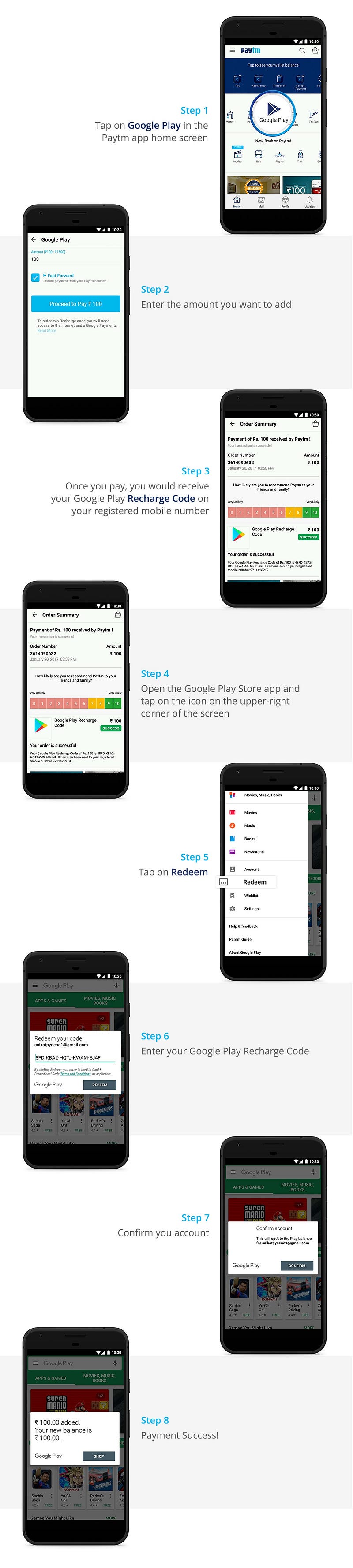
We have recently launched a one-click recharge for Google Play. This will help Android users across India to recharge their Google Play accounts in minutes.
Here is how it works:
In case you have some questions in your mind, here are some FAQs:
  1. Is there any minimum or maximum amount for recharge?
You can recharge between Rs. 100–1500 at a single go on Paytm.
2. What if I don’t have the Google Play app on my smartphone?
You can easily redeem the recharge code by logging on to g.co/playredeem.
3. What happens if my recharge fails?
We will offer you a unique serial number on the Paytm app and via SMS that you can use to follow up with Google.
4. What happens if I accidentally delete the SMS containing my Google Play Recharge Code?
You can always tap on the relevant order in the ‘My Orders’ tab in the Profile menu of your Paytm app to know your unique Google Play recharge code.
5. I want to download the digital invoice for my recharge.
Please tap on the relevant order in the ‘My Orders’ tab in the Profile menu of your Paytm app. You would see an option to download the official invoice for your recharge.
6. I want to repeat a transaction.
That’s easy. Once you transact on Paytm, we would offer a list of last Google Play recharge transactions in the ‘Recents’ tab. Tap on your preferred recharge amount to instantly recharge your Google Play account.

Monday, 23 January 2017

Cool In-Built Feature to Save Battery Life in Android SmartPhones

Today here I'm going to tell you about a cool feature which comes in-built with most of Smartphones.

Now a days smartphone comes with very High Resolution with bright Colors included (HD Displays)
which consumes lots of power to run.

So, here are the steps to save the battery 2 times better.

1> Go in Settings
2> Scroll down the page to Developer option. (if developer option isn't activate go to >about phone>device information>tap build number 5 to 7 times continuosly, as shown in the video)
3>Go to Developer option and scroll down the page.
4> Select "Simulate Color Space"
5> There you will see 5 option from those select "Monochromacy"

By selecting this option your whole phone displays changes into Black & White mode which does not consist any color. Your Phone's whole menu, setting etc inshort whole display changes to black and white mode which don't consume battery power and you can extend it 2 times more usable.

Note: It would be bad idea while looking and any Pictures or movies 'cause even that would be in black&white mode.


If you Don't like this Function and you want to disable it
> Just go to Simulate color space option and select Disable (1st option).

And other option to save battery which is consumed by Background Running Application can also be controled by you
>just go in Developer options
>Scroll down the page and toggle on the button of Don't keep Activites
>And second option "Background Process Limit" Select that option as at atmost 3-4 processes as per your choice of using application.

If your phone stucks around any apps or it frezze many times it happen just because your phone don't have enough free RAM.
So, Just go and downlaod Greenify App from playstore it is easily available on it.

Add all the applications running on your phone and hibernate it as you are done with your work on the application. this option will give RAM a free space to run device easily.
Or you have any other Question's about any query feel free to ask
2-Mind's.


Monday, 28 November 2016

How To: Change Your Ip In Less Then 1 Minute

How To: Change Your Ip In Less Then 1 Minute
1. Click on "Start" in the bottom left hand corner of screen
2. Click on "Run"
3. Type in "command" and hit ok
You should now be at an MSDOS prompt screen.
4. Type "ipconfig /release" just like that, and hit "enter"
5. Type "exit" and leave the prompt
6. Right-click on "Network Places" or "My Network Places" on your desktop.
7. Click on "properties"
    You should now be on a screen with something titled "Local Area Connection", or something close to    that, and,
     if you have a network hooked up, all of your other networks.
8. Right click on "Local Area Connection" and click "properties"
9. Double-click on the "Internet Protocol (TCP/IP)" from the list under the "General" tab
10. Click on "Use the following IP address" under the "General" tab
11. Create an IP address (It doesn't matter what it is. I just type 1 and 2 until i fill the area up).
12. Press "Tab" and it should automatically fill in the "Subnet Mask" section with default numbers.
13. Hit the "Ok" button here
14. Hit the "Ok" button again
      You should now be back to the "Local Area Connection" screen.
15. Right-click back on "Local Area Connection" and go to properties again.
16. Go back to the "TCP/IP" settings
17. This time, select "Obtain an IP address automatically"
      tongue.gif 18. Hit "Ok"
19. Hit "Ok" again
20. You now have a new IP address
      With a little practice, you can easily get this process down to 15 seconds.
Note:-
          This only changes your dynamic IP address, not your ISP/IP address. If you plan on hacking a          website with this trick be extremely careful, because if they try a little, they can trace it back .
                 Think before you Click...👍

Thursday, 27 October 2016

How to make UN-HACK-ABLE PASSWORD for your security purpose...

As per our last post, We decided to share...

How to make UN-HACK-ABLE PASSWORD for your security purpose...

- Actually you can make this UN-HACK-ABLE Password through your Smartphone easily.

- Just whenever you are going to type your "Password" 

Try to Use "ACCENTED LETTERS"... 
- To Access this letters simply hold down a letter on the Keyboard as per shown in the following Picture.


And select any letter with from top symbols.

You will think this thing is common, but in hacking process each letters have a different role. This will make your Password much stronger than Others. And one important thing, if you are keeping this type of password, Don't Forget about it. ;)

Let us know Is this post helpful for you, Just keep your Vote. 
If any doubt please lets us know through your comments.
Stay Connected, Stay Safe.
2-Mind Solutions.

Friday, 21 October 2016

How To Use PRO-RAT Software To Hack Password's

This is step by step tutorial that explains how to use pro rat software. ProRat is a Microsoft Windows based backdoor Trojan horse, more commonly known as a RAT (Remote Administration Tool). As with other Trojan horses it uses a client and server. ProRat opens a port on the computer which allows the client to perform numerous operations on the server (the machine being controlled). ProRat is available in a free version, and a paid version. In the free version, ProRat cannot connect to users over wide area networks (WANs), only over LAN (Local Area Networks). ProRat is known for its server to be almost impossible to remove without up-to-date antivirus software.


Follow The Steps To Setup PRO RAT Software

Step 1: Download free software called PRO RAT from this LINK . Once you downloaded pro rat software you'll see win rar file . Enter the password pro and extract it to your computer . Launch pro rat. Pro rat has a lot options as key logger, screen shot, file manager, PC shutdown. 

Step 2: You should create ProRat Server and send it to the target PC. To create server click on the bottom Create

hack facebook hack password

Step 3: Enter your IP address if you don't know your IP address click on red arrow . Also add your email address that will be used to send email notification. 

hack facebook hack password

Step 4: Next go to general settings, 5110 is port that you will connect to the target PC, you can change server password. You can give a fake error message, when target launch your remote file, error message will shown. You can type for error message what ever you want . 

hack facebook hack password

You can use option bind with the file. you can bind server with any file. I didn't use this option in this example. 

hack facebook hack password

hack facebook hack password

Under server extension I recommend to use EXE (has icon support ) or SCR (has icon support). 

hack facebook hack password

Under server icon select any icon that you want that your server look out. 

hack facebook hack password

Step 5: Click on Create Server . Now you need to send server file to the target PC. There are many ways how you can do it. You can create server file that looks as image and email it to your friends . The most effective way by my opinion is to bind server file to the movie file and upload it to the torrent or rapid share.  

Step 6: After the target clicks on your server file you'll be able to connect to the target PC. In main window of pro rat you'll see IP field. Type target PC address  There are many ways how to find target PC IP address. I recommend you to try to hack friends PC, so just ask your friend to give you IP address. In the port field type 5110 and click Connect. 

hack facebook hack password

hack facebook hack password

Screen shot of hacked PC : 

hack facebook hack password

File manager of hacked PC. You can download any file from hacked PC. 

hack facebook hack password

NOTE: This article is only for education purpose . Don't try to use it on the computers without user (owner of the computer that you want to hack ) permission!!!!

Sunday, 16 October 2016

Ransomeware Alert

Sorry For Late Post

Ransomware is the new threat spreading fast in the digital world!!!
This malicious software will lock your system+data and the hackers will ask for any amount of money to unlock it which is also not guaranteed.
For now, I can just say keep backups of your important data on multiple platforms. My friends of friends had started getting attacked by this.

Stay Connected & Be Safe

Top 5 ways to use trial software forever

Top 5 ways to use trial software forever Trial version software mostly comes with one month or a few days trial period and will expire af...